
PTZ Controller supports Sony PTZ cameras using the Sony VISCA protocol.
It can also control compatible PTZ cameras from other manufacturers that use the VISCA protocol. Because VISCA implementations may vary between camera manufacturers and models, compatibility should be tested with the actual camera.
Download PTZ Controller and use the 30-day free trial to test it with your camera.
Configure a Sony VISCA Camera
Download and install PTZ Controller.
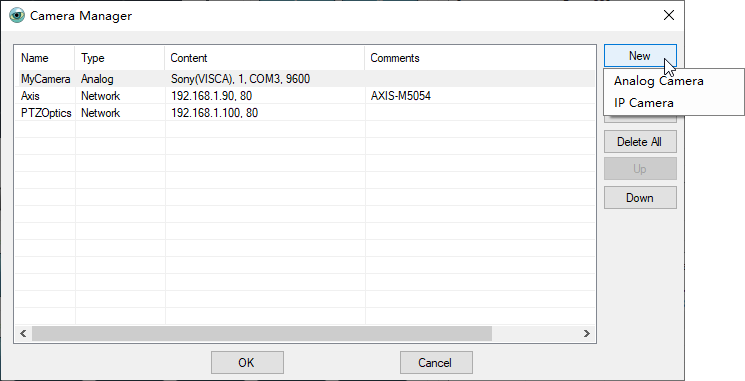
Click menu Setting –> Camera Manager to open Camera Manager panel.
- Click New, and select Analog Camera.
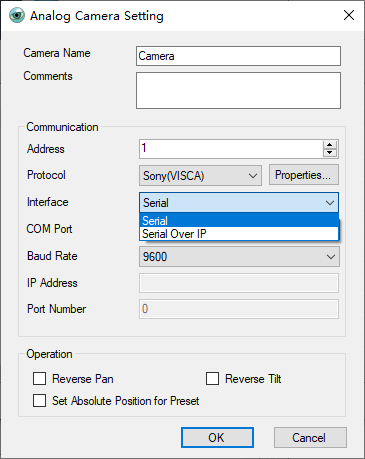
- Enter a camera name and select Sony(VISCA) as the protocol.
- Select the appropriate interface:
- Serial — for a Sony VISCA camera connected through a serial port. Select the correct COM port and baud rate.
- Serial Over IP — for VISCA serial communication through a network connection. Enter the appropriate IP address and port number.
- Set the camera address to match the address configured on the camera. This is especially important when multiple cameras are connected.
- Click OK to add the camera. The camera can then be selected and controlled from the Camera Panel.
PTZ Controller can control multiple compatible Sony/VISCA cameras. Each camera can have its own address and communication settings.
For more information, see:
How to Connect a PTZ Camera to a Computer
How to Test the Serial Connection Between a PTZ Camera and a Computer
Control Multiple PTZ Cameras with PTZ Controller